

Every electricity connection is unique, here's what you need to know, and what to expect.
Check that you're our customer
Check that you’re a Powerco customer. If you’re not on our map, you may not be our customer. Please visit the ENA website to find your electricity distributor.
Connection steps
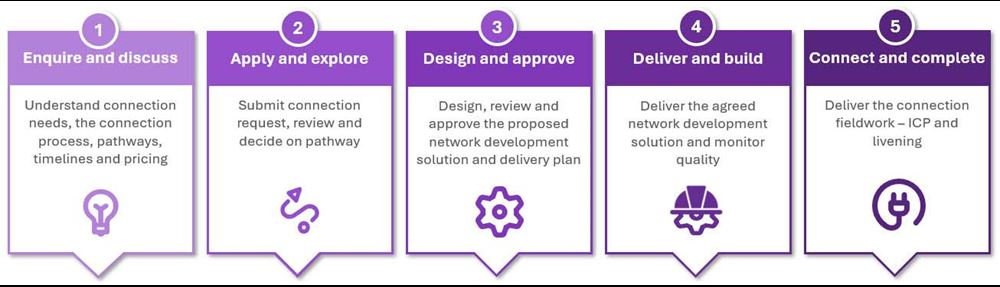
Step 1 - Enquire and discuss
Get in touch with us to understand the connection process and begin your connection journey. We'll let you know what you need and how the process will work. You may also need to talk to your electrician to help gather the information you need.
Step 2 - Apply and explore
Submit your connection request using Powerco Connect. We'll review your application and let you know the pathway.
Step 3 - Design and approve
Simple and complex only
If your connection requires network design and build, we'll provide you with one quote tailored to your connection needs. See pricing schedule for details.
Step 4 - Deliver and build
Once the offer is accepted and paid, the job is scheduled and built.
Step 5 - Connect and complete
When construction is complete, the Customer Hub team manages the connection process. Our network connections team updates the registry and the job is closed.
Who does what?
You or your electrician can submit a request for an electricity connection or modification on behalf of a customer. Here are the terms we use as part of the application process.
Applicant - the person submitting the application.
Customer - property owner or person the connection is for.
Contractor - an approved organisation or individual that can carry out work on our network
Electrician - licensed person responsible for electrical work.
Invoice payer - person or business paying any design or connection-related invoices/paying for the work.
Electricity bill payer - person who will receive on-going electricity bills from their retailer.
Powerco Connect - how to sign or reassign offers
View and sign an offer
Find out how to view and sign an offer when you are using Powerco Connect.
Reassign an offer
Find out how to reassign an offer when you are using Powerco Connect.

Need an estimate or connection advice?
Speak with one of our team about your project before submitting a formal request.